
Ultralytics
Ultralytics YOLO 활용 실습
- 다양한 YOLO 모델을 지원하는 강력하고 사용자 친화적인 PyTorch 기반 프레임워크
- 사전 학습된 모델을 제공
- 학습, 평가, 추론이 매우 간단함
설치:
!pip install ultralytics
설치 확인:
import ultralytics
ultralytics.checks()
COCO Dataset
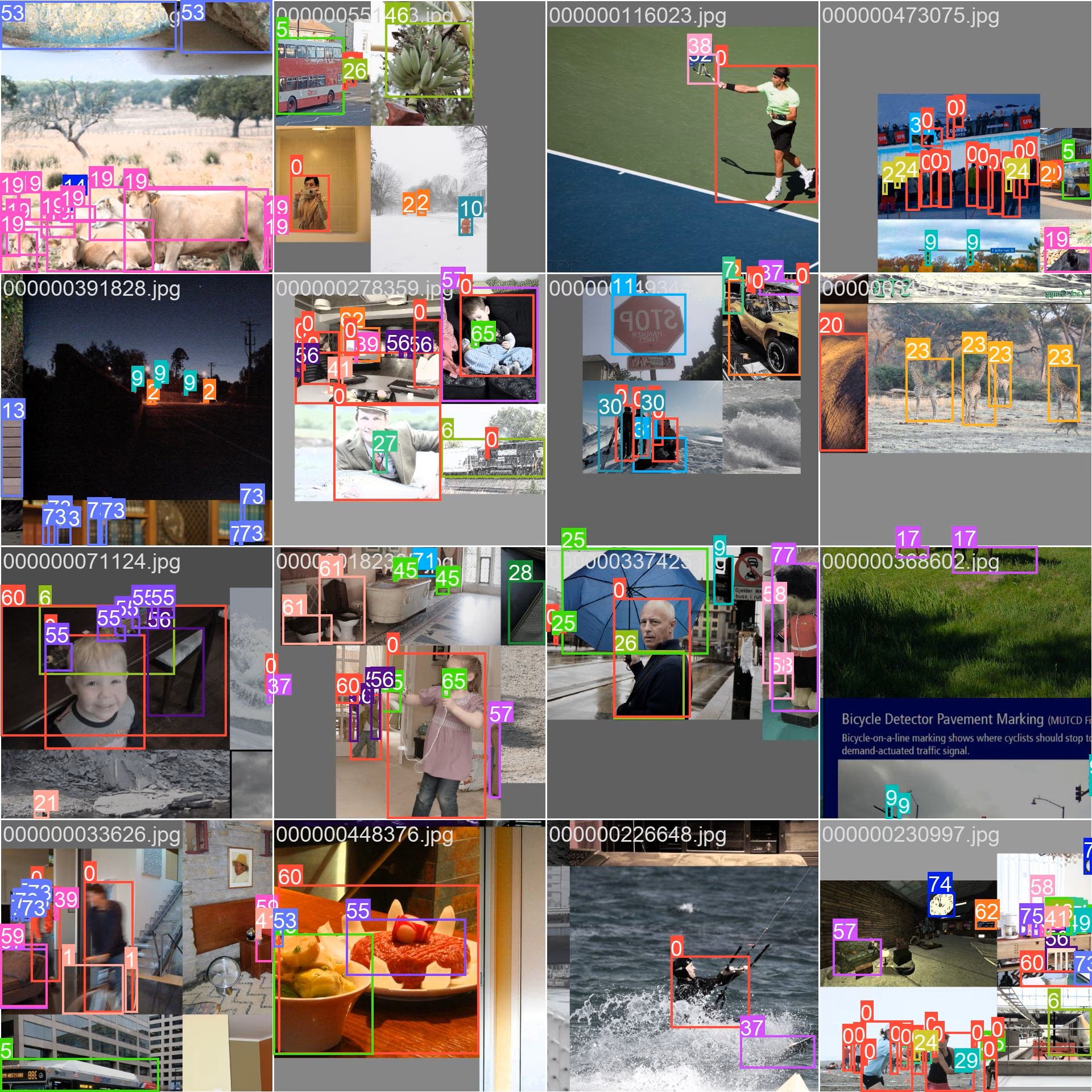
- COCO (Common Objects in Context)
- 대규모 객체 인식, 세그멘테이션, 캡셔닝 데이터셋
- 서브셋:
- Train2017: 훈련용 118K 이미지
- Val2017: 검증용 5K 이미지
- Test2017: 테스트용 20K 이미지
- 80개 사물 카테고리: 자동차, 자전거, 동물 등
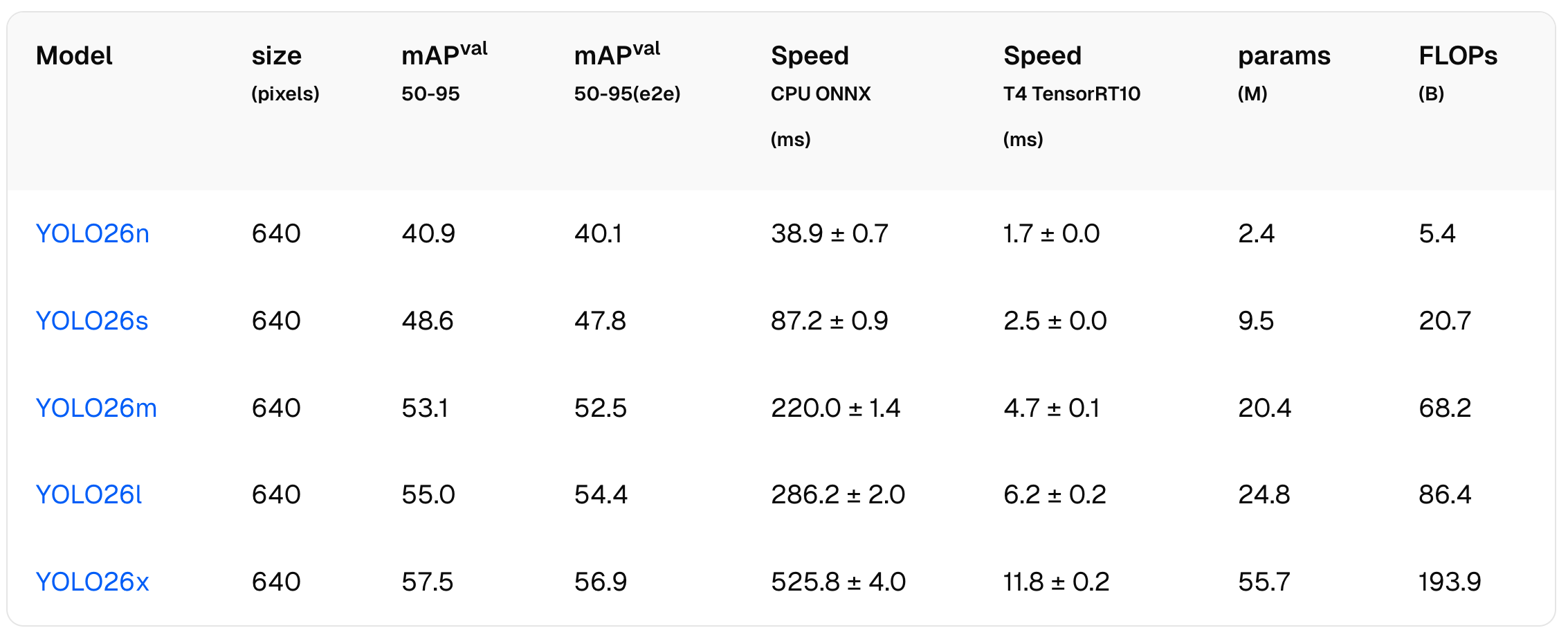
모델 종류
- COCO 데이터셋에 사전 학습
- 모든 모델은 640x640 크기의 이미지를 입력으로 받음
- 크기가 다를 경우 자동으로 리사이즈
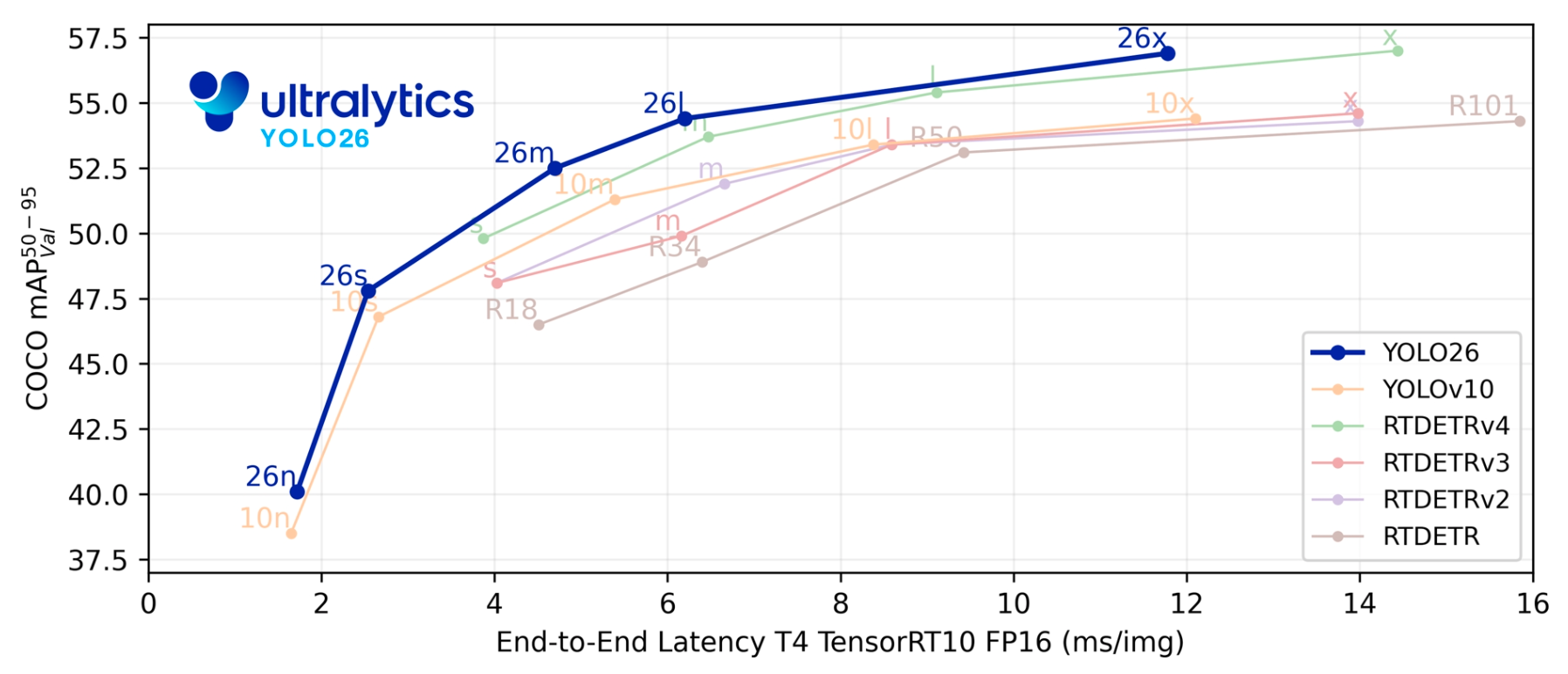
- n → s → m → l → x 순으로 커짐
- 작을 수록 빠르고, 클 수록 성능이 높음
사전 학습된 모델을 이용한 객체 인식
from ultralytics import YOLO # 임포트
model = YOLO("yolo26n.pt") # 모델 로딩

# 이미지 파일에 적용
results = model('bus_stop.jpg')

# OpenCV에서 파일을 불러들여서 모델에 적용하는 방법
import cv2 as cv
img = cv.imread("bus_stop.jpg") # OpenCV로 파일 열기
results = model(img)  # 이미지에 모델 적용

# 일정 수준 이상의 확률을 가진 물체만 탐지하는 방법
results = model(img, conf=0.8) # 확률 80% 이상인 물체만 탐지
결과 출력
# 결과 출력 (바운딩 박스, 클래스, 신뢰도)
for r in results:
    print(r.boxes.xyxy) # 바운딩 박스 좌표
    print(r.boxes.cls)  # 클래스 ID
    print(r.boxes.conf) # 탐지 신뢰도 = 물체의 확률 × 상자의 정확도

# 시각화
from PIL import Image
array = results[0].plot()
Image.fromarray(array[:, :, ::-1])

# 팝업
results[0].show()
수동 시각화
# 임포트
from PIL import Image, ImageDraw, ImageFont

# 글꼴 설정: 같은 폴더에 ttf 글꼴 파일이 있어야 함. 없으면 기본 글꼴 사용.
try:
    font = ImageFont.truetype("NanumGothic.ttf", 20)
except IOError:
    font = ImageFont.load_default()

# 결과를 그릴 새 이미지 만듦
img_bbox = Image.fromarray(cv.cvtColor(img, cv.COLOR_BGR2RGB))
draw = ImageDraw.Draw(img_bbox)

# 결과
result = results[0] # 이미지가 하나이므로 결과도 하나
boxes = result.boxes # 모든 경계상자의 정보

# 시각화

for i, box in enumerate(boxes):  # 모든 경계 상자에 다음의 작업을 수행
    xyxy = box.xyxy[0].cpu().numpy()  # 좌표값 (x1, y1, x2, y2)
    cls_id = int(box.cls[0].cpu().numpy())  # 클래스 ID
    confidence = float(box.conf[0].cpu().numpy())  # 확률
    x1, y1, x2, y2 = xyxy.astype(int)  # 좌표값 언패킹
    draw.rectangle([x1, y1, x2, y2], outline="#00FF00", width=3)  # 초록색 경계 상자
    label = f"{result.names[cls_id]}({confidence:.2f})"  # 클래스 이름 및 신뢰도
    draw.text((x1, y1), label, fill="#00FF00", font=font)  # 레이블 쓰기

img_bbox  # 결과 보기
퀴즈
COCO 데이터셋에 사전 학습된 탐지 모델을 별도의 재학습 없이 일반 도로 이미지에 적용했습니다. 기대할 수 있는 결과로 가장 알맞은 것은 무엇입니까?
퀴즈를 풀려면 대화형 기능을 불러와야 합니다.